 Cozy
Y2K Aesthetic
Bubbly, glossy, candy-colored. Your desktop just booted back to the 2000s.
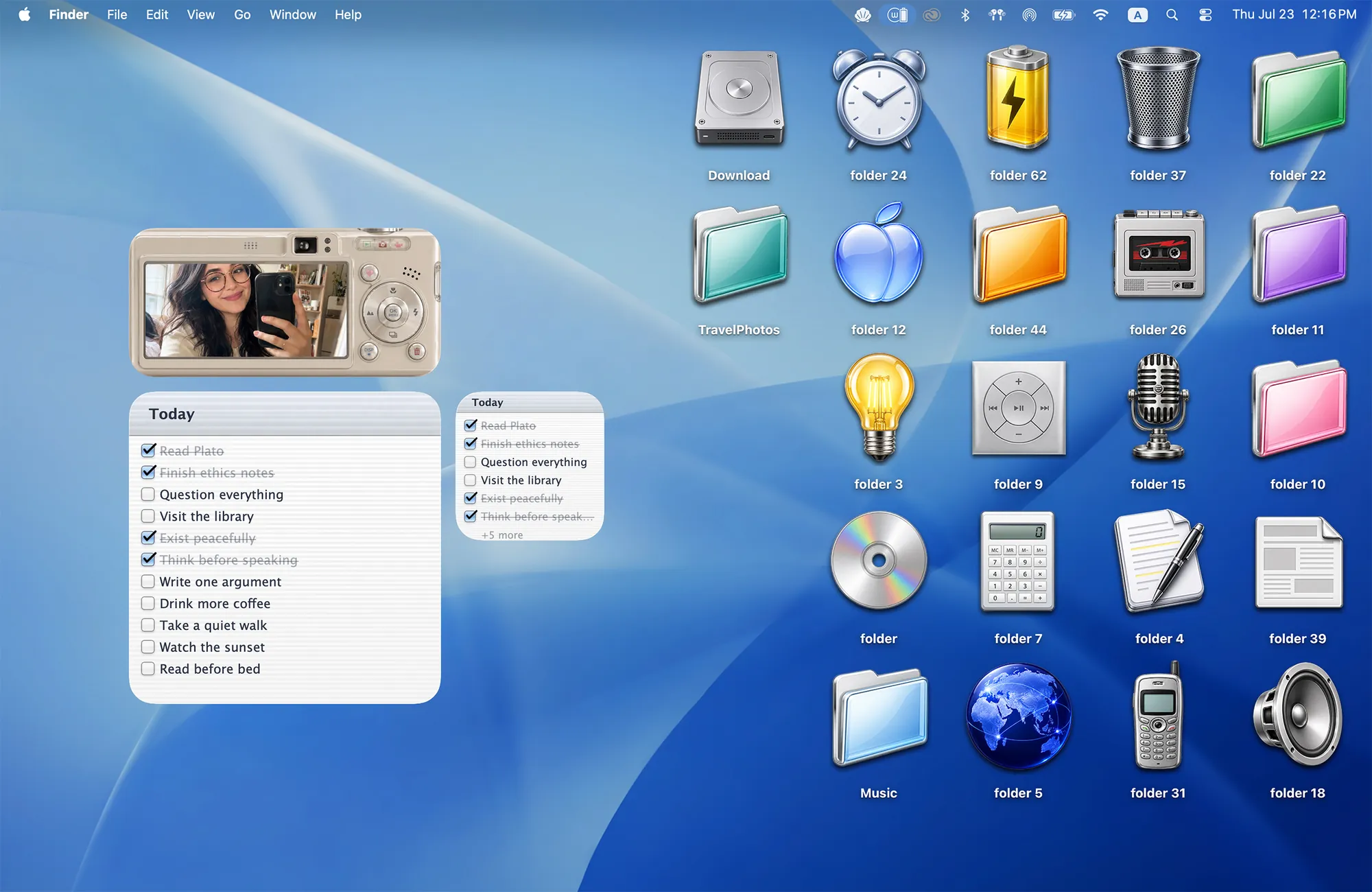
Living in a Y2K dream. Frame your favorite photo in a retro digicam, check off to-dos on a notepad, and line up 22 glossy folders.
What's included
- 22 folder icons: Glossy Folders 6, Music 5, Retro Tech 4, Desk Essentials 7
- Widgets: Album & Todo
- One wallpaper, drawn together with the icons and widgets
One space, designed together
Y2K Aesthetic brings back the glossy early-2000s computer, all at once. The swooping blue wallpaper, the chrome and candy folder icons and the widgets share one look, so nothing feels borrowed from a different era. Your favorite photo sits in a retro digital camera, your to-dos live on a lined notepad, and folders become a CD, a flip phone, a microphone and a battery. It reads like a desktop that just booted up in 2003.
Your favorite photo, back in a digicam
The little camera is an Album widget. Click it on your desktop to open Cozy’s album editor, then use Add Photos to bring in pictures from your Mac. A friend, a weekend away, a very good cat photo. Anything you want to keep close.
Add one picture for a single favorite, or several for a rotating album. Click a thumbnail in the editor to crop it, drag to reposition, adjust the zoom and click Done. All Cozy Album themes use the same photo library.
New to desktop widgets? Follow the photo widget tutorial from the gallery to your first photo.
A place for the little things
Keep the camera above your notepad widgets, then group the glossy folders on the other side of the desktop. A CD can hold music projects; a flip phone can hold old pictures. Leave some blue space between the two sides and the whole setup feels a little lighter.
Best for
- Anyone who misses the look of 2000s computers
- A playful desktop for school or creative work
- Pairing with a retro phone case or stickers on your MacBook
How to get this look on your MacBook
- Download Cozy from the Mac App Store. Rainbow Felt is free; unlock Y2K Aesthetic with the one-time purchase.
- Open Cozy from the menu bar, pick Y2K Aesthetic and click Apply. The wallpaper and folder icons change together.
- Control-click the desktop and choose Edit Widgets. Search for Cozy, then add the Y2K Album and Todo widgets separately.
- Click the camera widget to add your photos. Place it above the notepad widgets, and arrange your folders where you like.
FAQ
What comes with Y2K Aesthetic?
22 glossy folder icons in four groups (glossy folders, music, retro tech and desk essentials), a photo album widget framed as a digicam, and two to-do widgets.
Can I put my own photo in the camera widget?
Yes. Click the camera widget to open Cozy’s album editor, then use Add Photos to choose pictures from your Mac. Click a thumbnail to adjust its crop.
Does Y2K Aesthetic work on MacBook Air, MacBook Pro and MacBook Neo?
Yes. Cozy runs on any Mac with macOS 14 or later and fits each theme to MacBook and iMac screens.
Is Y2K Aesthetic free?
Cozy is free to download with one free theme, Rainbow Felt. Y2K Aesthetic is included in the one-time unlock, along with every other theme and future ones.
Can I go back to my old folder icons?
Yes. Folder icons are a standard macOS setting, and you can restore the default icons at any time.
Get the whole look on your Mac
Cozy is free to try with Rainbow Felt. One purchase unlocks every theme, including new ones.

For Mac · macOS 14 or later