 Cozy
CozySunflowers in Shades
Sunny yellow on sky blue, Van Gogh's iconic flowers. Shades on, colors bright, mood lifted.
Get Sunflowers in Shades in Cozy for Mac
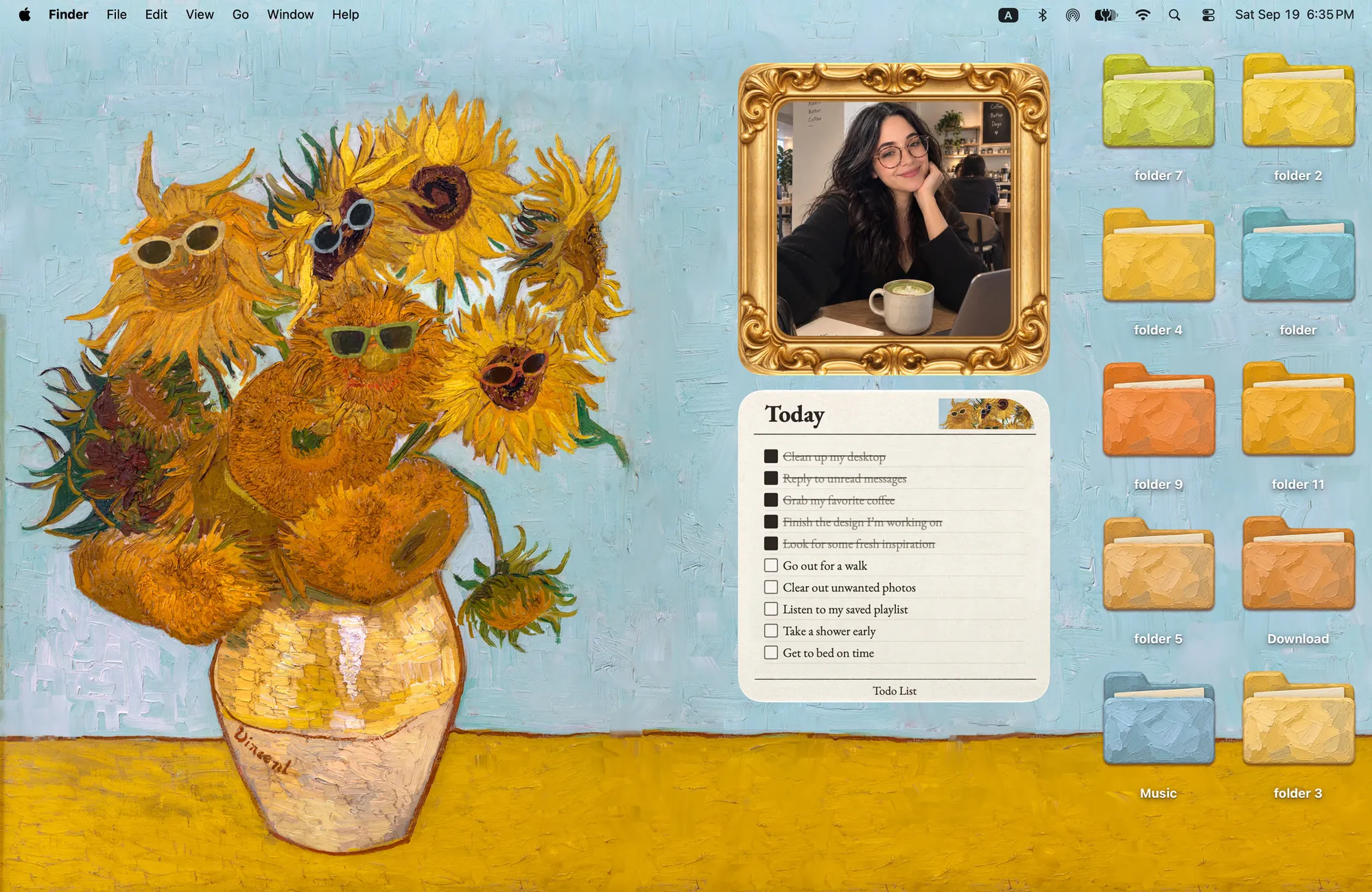
Bring a little sunshine to your day. Oil-paint folders, a gold photo frame and a to-do card, all matching the art.
What's included
- 10 folder icons: Oil-Paint Folders 10
- Widgets: Album & Todo
- One wallpaper, drawn together with the icons and widgets
One space, designed together
Sunflowers in Shades borrows Van Gogh's famous vase of sunflowers and gives it a pair of sunglasses. The folder icons are painted with the same thick oil strokes in yellow, orange and sky blue, so they look like they came off the same canvas. A gold frame holds your photo and a to-do card sits beside it, both matching the painting. The result is an art print you actually work on, bright enough to lift a gray day.
Best for
- Art lovers who want a painting on their desktop
- A bright, happy workspace for gray days
- Students of art history with a sense of humor
How to get this look on your MacBook
- Download Cozy from the Mac App Store. It is free to try.
- Open Cozy from the menu bar and pick Sunflowers in Shades.
- Click Apply. Your desktop wallpaper and folder icons change together, and your MacBook home screen looks like the picture above. Then add the matching widgets from the widget gallery.
FAQ
Is this the real Van Gogh painting?
It is a new illustration inspired by Van Gogh's sunflowers, redrawn with sunglasses and matching oil-paint folder icons.
What widgets come with Sunflowers in Shades?
Two photo album widgets in a gold frame and two to-do widgets drawn as a card.
Does Sunflowers in Shades work on MacBook Air, MacBook Pro and MacBook Neo?
Yes. Cozy runs on any Mac with macOS 14 or later and fits each theme to MacBook and iMac screens.
Is Sunflowers in Shades free?
Cozy is free to download with one free theme, Rainbow Felt. Sunflowers in Shades is included in the one-time unlock, along with every other theme and future ones.
Can I go back to my old folder icons?
Yes. Folder icons are a standard macOS setting, and you can restore the default icons at any time.
Get the whole look on your Mac
Cozy is free to try with Rainbow Felt. One purchase unlocks every theme, including new ones.
Download Cozy on the Mac App Store